Tutorial 3 of 7
Subscriptions, contracts and notice deadlines
Intermediate 8 min
Audit your subscriptions, get verified cancellation steps and a letter, let Ledgerly compute the last day to cancel each contract and put every date into your calendar app.
Forgotten renewals are the most expensive kind of household admin. This tutorial uses the City couple, renting example.
1. Audit the subscriptions
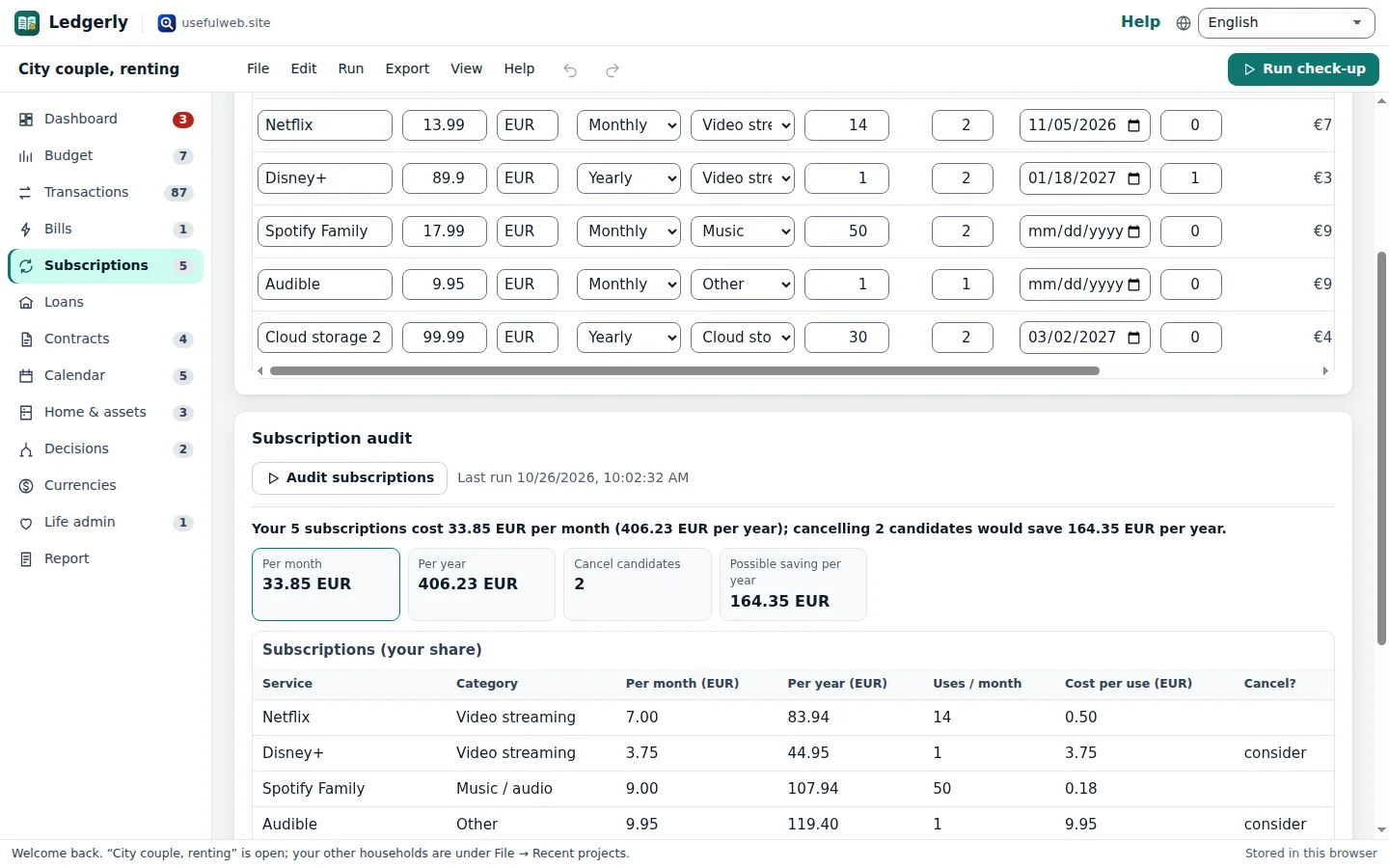
Open Subscriptions. Each row has the Price, Currency, Billing period, Category, Uses per month and Shared by (the price is divided by the number of people who pay). Your share per month is calculated as you type.
Click Audit subscriptions. Subscription Stack computes the cost per use, finds overlaps (two video services) and cancel candidates. In the example it suggests cancelling Disney+ (it overlaps with Netflix and is used once a month) and Audible (used once a month), saving €164.35 per year.
Prices in another currency are converted to your home currency first — see the Currencies desk.
2. How to cancel
Click How to cancel in a row. Choose the Service (Netflix, Spotify, Disney+, Amazon Prime, Adobe … or Another service), optionally your name for the letter, and click Show cancellation steps. Cancellation Navigator returns the steps from the provider's help page, your rights in the country set under File → Household settings…, and a ready cancellation letter to download. Add a cancel reminder to the calendar puts a reminder a few days before the renewal.
3. Contract notice dates
Open Contracts. For each contract enter the Start date, the Minimum term (months), how it Renews by (months, 0 = ends) and the Notice period with its unit (days, weeks or months). Ledgerly computes:
- Term ends — the next term end you can still reach;
- Give notice by — the term end minus the notice period, with the days left;
- Status — Running, Notice due soon (30 days or less), Ended, Cancel any time or Cancelled.
In the example the gym (12 months minimum, renews monthly, 4 weeks' notice, started 2 November 2025) must be cancelled by 4 November 2026 for the term ending 2 December. Tick Cancelled once you have sent the notice; the contract then leaves your fixed costs.
Ledgerly applies the terms you enter. Some countries give consumers shorter notice periods after the minimum term — check your contract and local rules.
4. Find hidden fees in a quote
Below the table, open Quote or contract text for a contract, paste the price list or invoice (one cost per line) and click Find hidden fees. Hidden Fee Finder separates base price, fees, recurring add-ons, discounts and conditional charges. If more than 10 % of the total are fees and extras, the Dashboard shows a finding.
5. Everything in one calendar
The Calendar desk merges your own deadlines with notice dates, subscription renewals, fixed-rate ends of loans, warranty ends and planned replacements. Filter by Open, Overdue, Done or All, tick off your own deadlines, and set Reminder before each date (days).
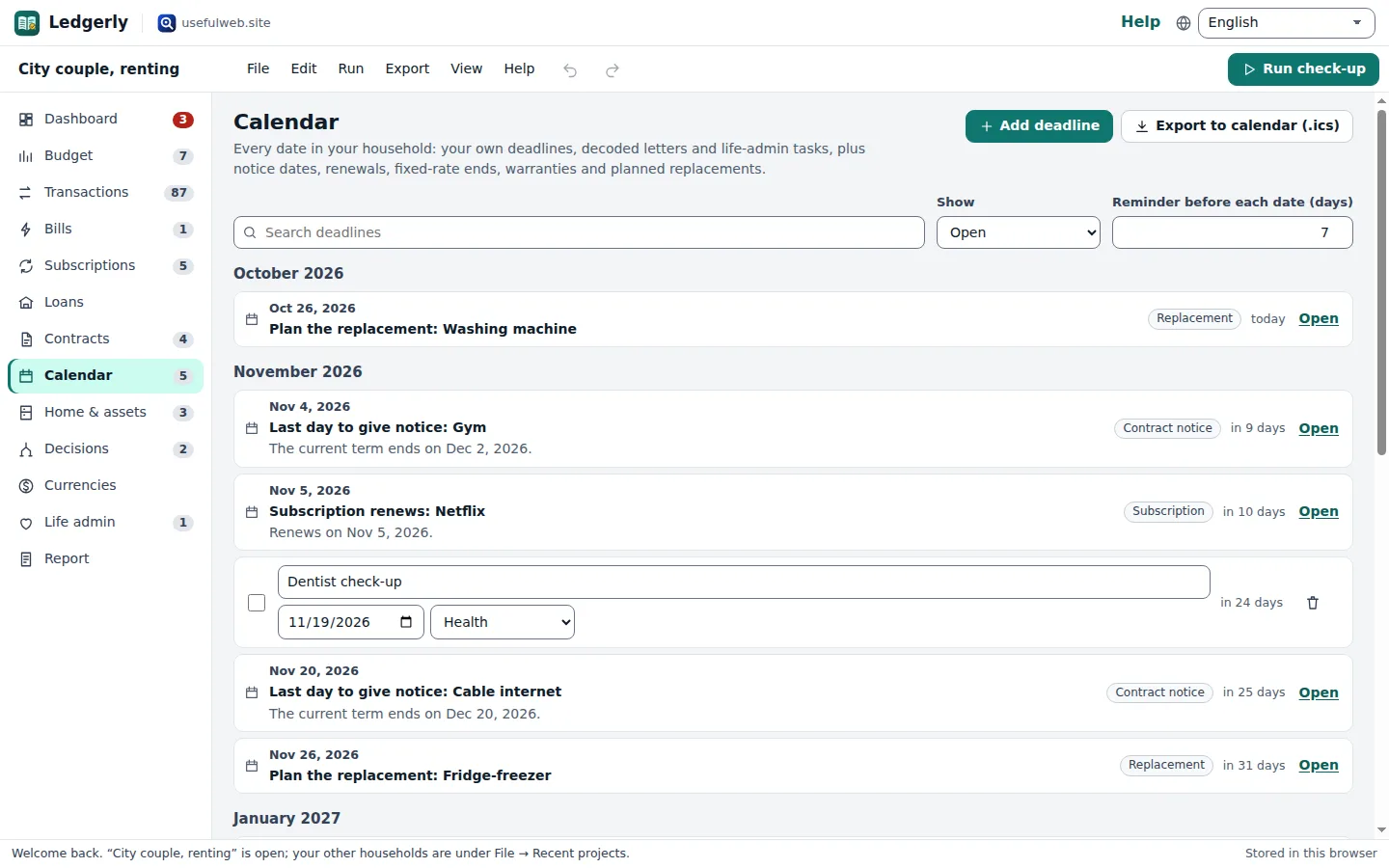
Export to calendar (.ics) downloads all open dates as an iCalendar file with reminders; open it with Google Calendar, Outlook or Apple Calendar.
Ready to try it?