Tutorial 1 of 7
Your first household check-up in 5 minutes
Beginner 5 min
Open an example household, run the one-click check-up and learn to read the dashboard — cash flow, findings and what is due next.
Ledgerly keeps your household in this browser. Nothing is uploaded until a tool runs, and then only that tool's inputs go to the usefulweb.site API. This tutorial uses an invented example so you can explore without typing anything.
1. Open an example household
Click Launch Ledgerly. On a first visit the Dashboard shows Start with an example household. Choose City couple, renting — two salaries, a rented flat, three months of bank rows, five subscriptions, four contracts, an electricity meter and a payment reminder.
The left column lists the desks: Dashboard, Budget, Transactions, Bills, Subscriptions, Loans, Contracts, Calendar, Home & assets, Decisions, Currencies, Life admin and Report. The small numbers show how many items each desk holds.
2. Run the check-up
Press Run check-up (top right, or Ctrl+Enter). The dialog lists every tool run your data supports:
| Step | Tool |
|---|---|
| Subscription audit | Subscription Stack |
| Bills of “Electricity” | Bill Detective |
| Remaining life of each appliance | How Long Will It Last? |
| Fees in the “Cable internet” quote | Hidden Fee Finder |
| Deadlines in the payment reminder | Deadline Decoder |
Click Start check-up. The steps run one after the other with a progress bar; you can keep the dialog open or close it — the run continues. When it ends you see a line such as Check-up finished. Tool runs done: 7; already up to date: 0; findings: 12. Click Show findings.
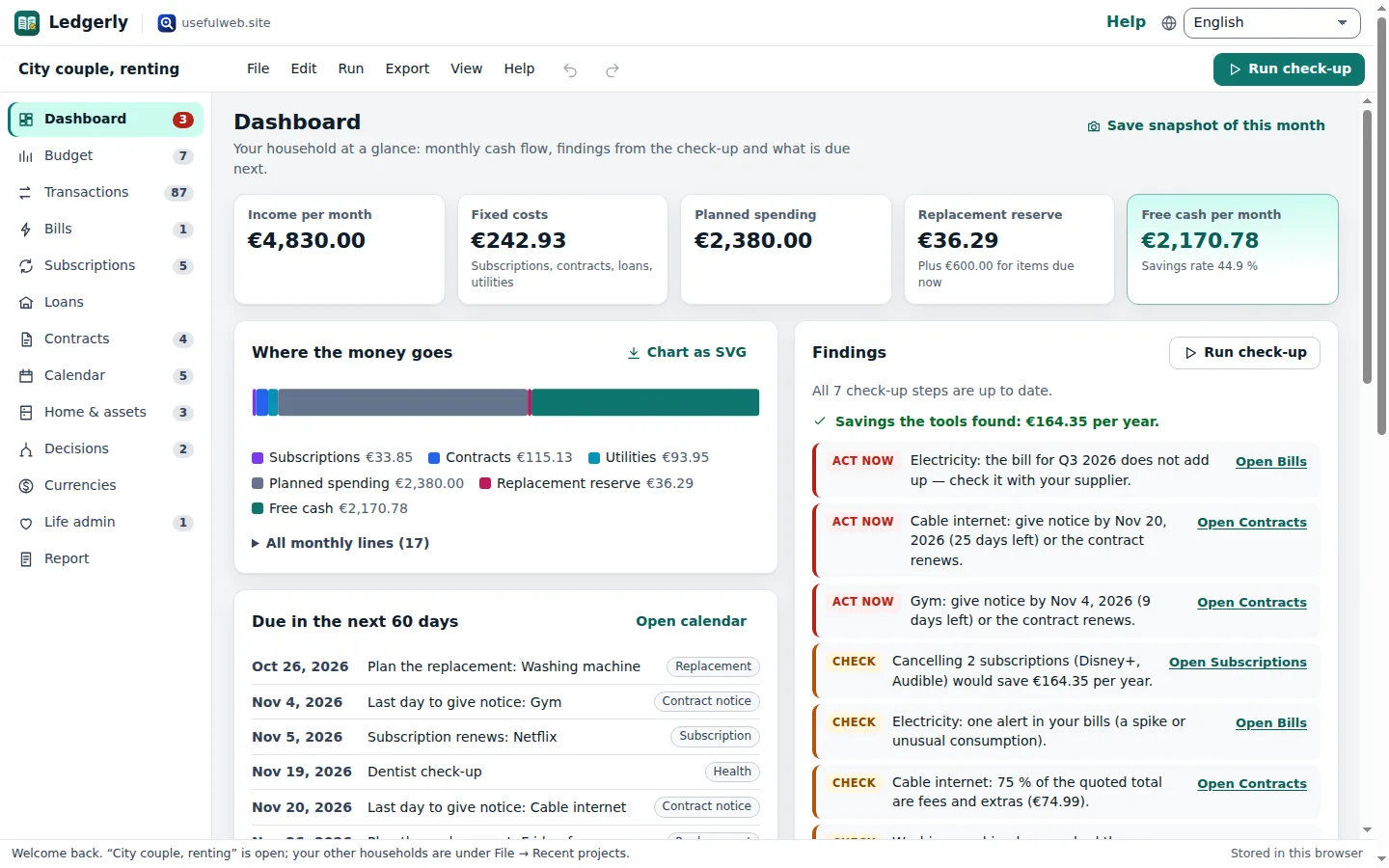
3. Read the dashboard
- Income per month, Fixed costs, Planned spending, Replacement reserve and Free cash per month come from your own entries plus the tool results. Fixed costs are subscriptions, contracts, loan payments and the average utility bill.
- Where the money goes is one bar from income to free cash. Open All monthly lines to see every line with the desk it comes from.
- Findings are sorted by urgency: Act now, Check, Note and Good. In the example you will find that the Q3 electricity bill does not add up, that the gym contract must be cancelled by 4 November, and that cancelling Disney+ and Audible would save €164.35 per year. Each finding has a button that opens the right desk.
- Due in the next 60 days merges deadlines from every desk.
4. Change something and see what goes stale
Open Subscriptions and change the price of Netflix. Back on the Dashboard the findings card now says that one check-up step has not run with your current data. Ledgerly remembers which input each result belongs to, so the next check-up only re-runs that step (tick Run everything again to force all of them).
5. Your own household
Use File → New household to start empty. Everything is autosaved in this browser after your first edit; File → Save project file (Ctrl+S) writes a .ledgerly.json file you can keep or move to another device.
Next: Import your bank statement.
Ready to try it?